If you use LinkedIn for hiring, sales, or outreach, you have probably asked this question: should I use InMail or Messages?
Choosing the wrong option can lead to low reply rates and wasted time.
In this blog, we’ll break down the difference between LinkedIn InMail vs LinkedIn Messages.
You’ll learn when to use InMail, when Messages work better, and how to choose the right one based on your goal.
We’ll also show how tools like Salesforge can help you send the right message at the right time, without extra manual work.
LinkedIn InMail vs LinkedIn Messages: Quick Comparison
LinkedIn InMail vs LinkedIn Messages
Feature
LinkedIn InMail
LinkedIn Messages
Connection required
No
Yes
Best for
Cold outreach
Warm conversations
Who you can contact
Anyone on LinkedIn
Only your connections
Cost
Paid (InMail credits)
Free
Message limit
Limited credits
No strict limit
Typical reply rate
Medium
Higher
Use case
Hiring, sales, partnerships
Follow-ups, networking
Urgency level
High-value messages
Casual or ongoing chats
What Is LinkedIn InMail?
LinkedIn InMail is a paid messaging feature on LinkedIn. It lets you send a message to someone even if you are not connected with them.
With a free LinkedIn account, you can only message people you are already connected to. To send InMail, you need a LinkedIn Premium account.
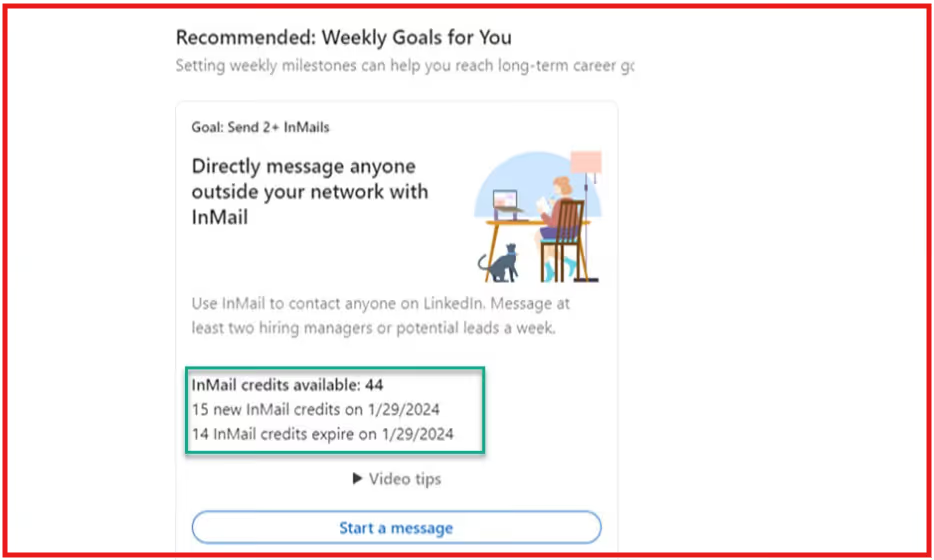
This image shows the LinkedIn Mail works on credits
InMail works using credits. Each Premium plan gives you a limited number of InMail credits every month.
When you send an InMail, one credit is used.
Here are a few important things to know:
InMail is not unlimited
You can only send InMail if the other person allows it in their settings
InMail credits are different from messages sent through Sales Navigator or LinkedIn Recruiter
In short, LinkedIn InMail is used for cold outreach when you need to contact people outside your network.
What Are LinkedIn Messages?
LinkedIn Messages is the free messaging feature on LinkedIn. It lets you talk to people you are already connected with on the platform.
You can only send messages to your 1st-degree connections for free.
If you are not connected to someone, you cannot message them unless you use LinkedIn InMail.
You can start a message from the Messaging page or directly from a person’s profile.
LinkedIn Messages also allows you to:
Send messages to one person or to multiple connections at once
Continue past conversations and reply anytime
Search messages using keywords
Mute or leave conversations
Delete conversations if needed
Messages are best for ongoing conversations, follow-ups, and relationship building with people you already know.
In simple terms, LinkedIn Messages is used for warm communication with existing connections.
LinkedIn InMail vs LinkedIn Messages: 7 Key Differences
LinkedIn InMail and LinkedIn Messages both let you send private messages on LinkedIn.
But they work in very different ways and are used for different situations.
The table below shows the 7 main differences in a simple way.
LinkedIn InMail vs LinkedIn Messages — Detailed Comparison
Feature
LinkedIn InMail
LinkedIn Messages
Connection needed
No connection needed
Must be connected
Who you can message
Anyone (1st, 2nd, or 3rd degree)
Only 1st-degree connections
Account type
Paid (LinkedIn Premium)
Free account
Cost
Uses InMail credits
Free
Message limit
Limited credits per month
No credit limit
Recipient control
Can be blocked by user settings
Always delivered to connections
Best use case
Cold outreach and first contact
Warm chats and follow-ups
In simple terms, use InMail when you're reaching out to someone you don’t know or aren’t connected to yet, like a potential hire or sales lead.
You can use Messages when you’re already connected and want to follow up, chat, or build a relationship.
When Should You Use LinkedIn InMail?
Use LinkedIn InMail when you want to contact someone you are not connected with on LinkedIn.
You should use InMail when:
You need to reach a person outside your network
You want to do cold outreach
You are hiring passive candidates who are not actively looking for jobs
You want to contact decision-makers or senior leaders
You need to send a high-value or important message
You don’t want to wait for someone to accept your connection request
In simple terms, LinkedIn InMail is best for first contact when a normal LinkedIn Message is not possible.
When Should You Use LinkedIn Messages?
Use LinkedIn Messages when you are already connected with the person on LinkedIn.
You should use LinkedIn Messages when:
You want to talk to your 1st-degree connections
You are following up after someone accepted your connection request
You want to continue an existing conversation
You are building long-term relationships
You want to send casual or low-pressure messages
You don’t want to use paid InMail credits
In simple terms, LinkedIn Messages are best for warm conversations with people you are already connected to.
Common Mistakes People Make with InMail and Messages
Many people send LinkedIn InMail or Messages but do not get replies because they use them in the wrong way.
These mistakes usually happen when people rush outreach or do not understand how each option should be used.
Here are the most common mistakes and what they cause:
Using InMail when a free Message would be enough: Many users waste InMail credits on people they’re already connected with, even though a normal LinkedIn Message would do the job for free.
Sending a pitch immediately after connecting: Starting with a sales or hiring pitch right after someone accepts your connection can feel pushy and make the other person lose interest fast.
Writing long, hard-to-read messages: Messages that are longer than 5–6 lines are often skipped, especially on mobile. Most people prefer short, clear messages they can scan.
Not personalizing the message: Generic, copy-paste messages that don’t mention the person’s role, work, or background look lazy and get ignored.
Failing to explain why you're reaching out: If your message doesn’t clearly say why you're contacting the person or what you want, they’re less likely to reply.
Skipping follow-ups or following up too soon: Not sending a follow-up message means missing out on potential replies. But following up too soon, like within 24 hours, can seem annoying or desperate.
How Salesforge Helps You Use LinkedIn Outreach Better?
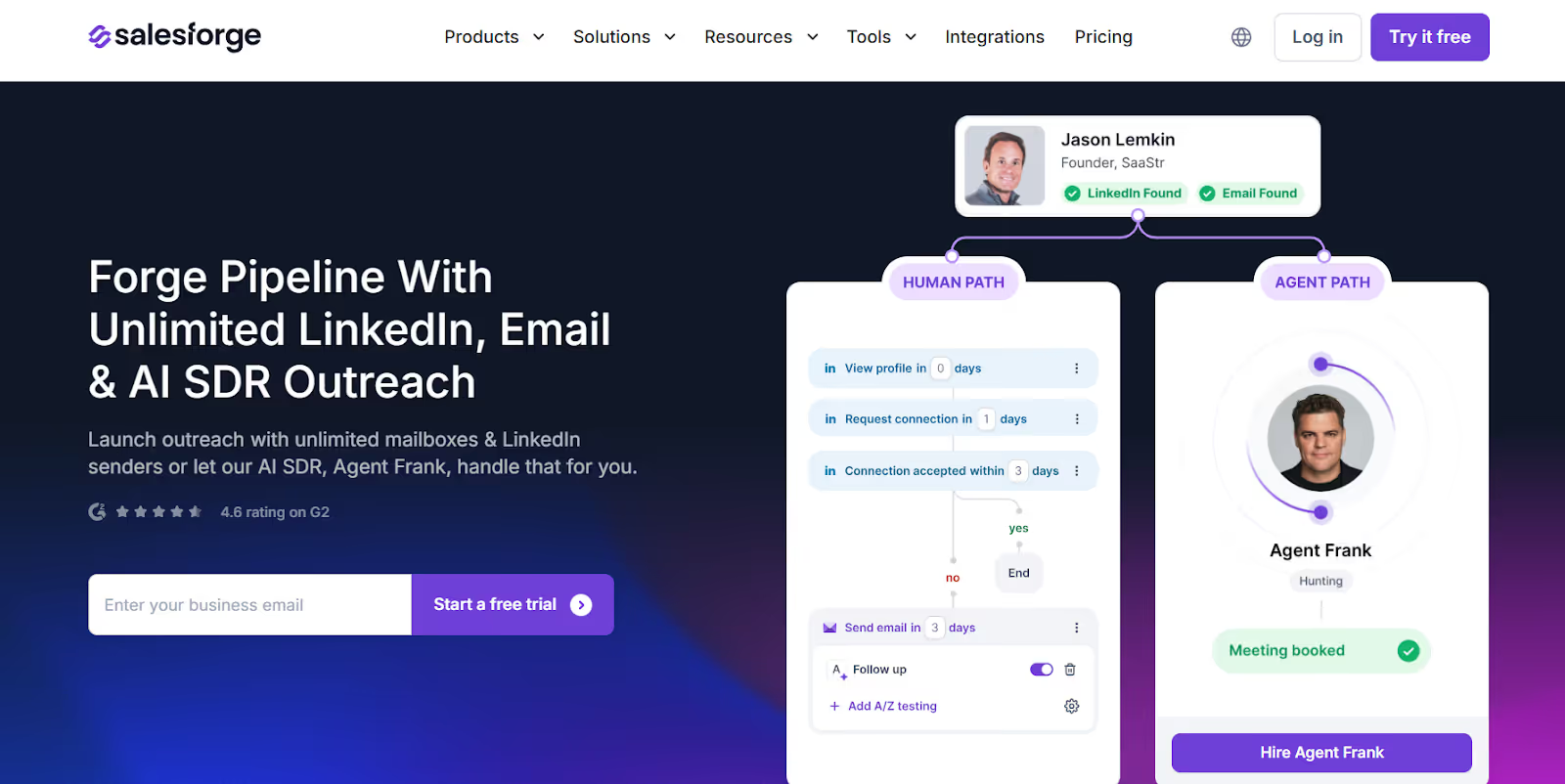
This image shows the Salesforge homepage
Salesforge is an all-in-one outbound outreach platform that helps teams run LinkedIn and email outreach at scale from one place.
Sending LinkedIn InMail or Messages manually takes time and often leads to mistakes like poor timing, weak follow-ups, or generic messages.
Salesforge helps fix these problems by automating and organizing your outreach.
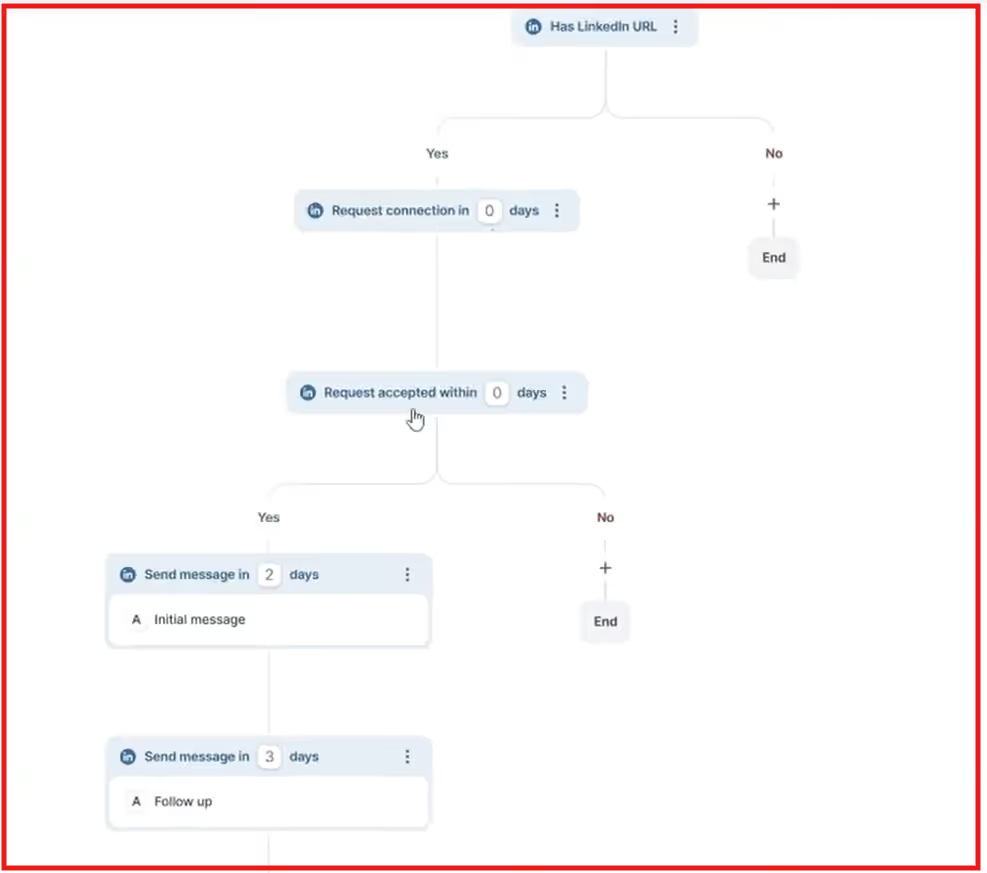
This image shows the Salesforge unlimited mutlchannel sequence for LinkedIn
Here’s how Salesforge helps you use LinkedIn outreach better:
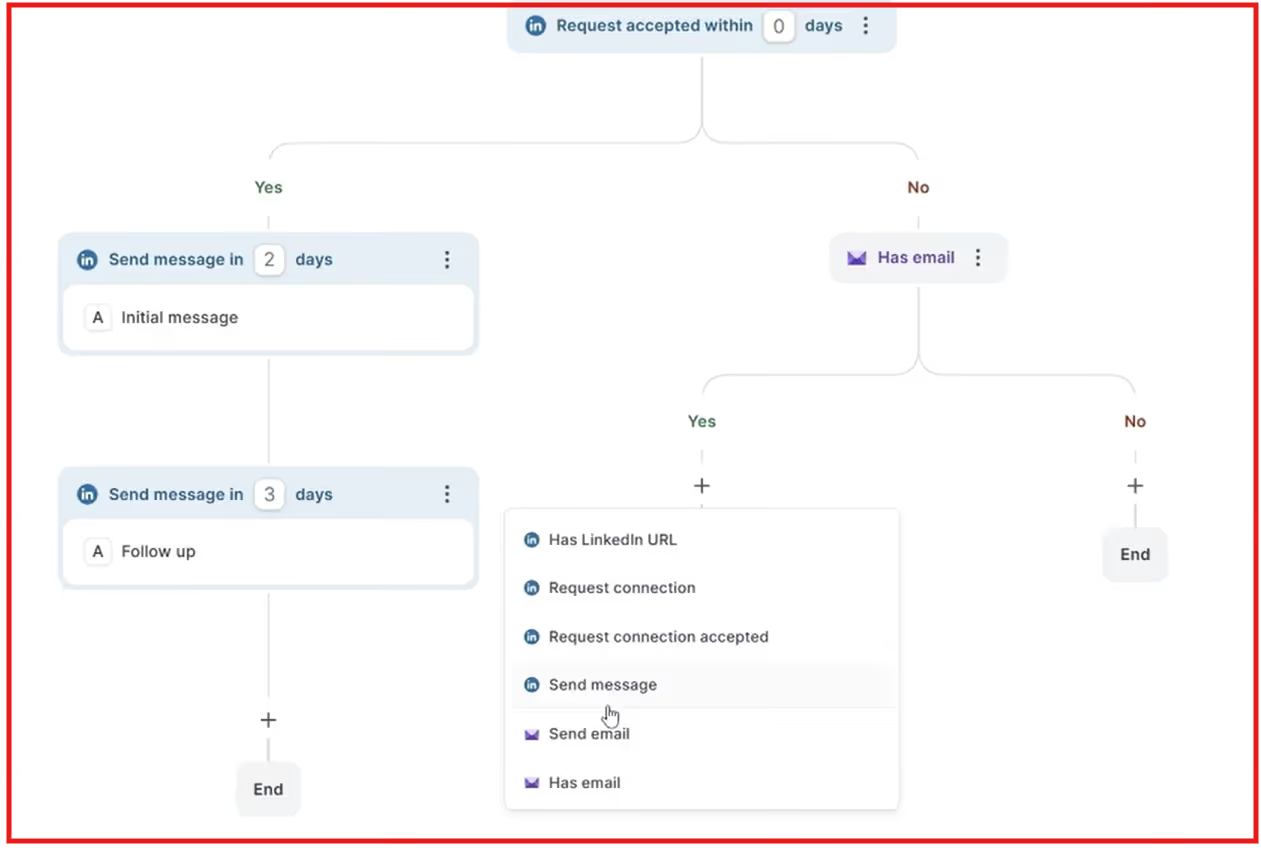
Runs LinkedIn and email outreach together: You can build multichannel sequences that include LinkedIn actions and emails in one simple workflow.
This image shows the LinkedIn and email outreach together with Salesforge
Supports unlimited LinkedIn senders and mailboxes: Salesforge does not limit you by seats, so your whole team can send outreach without extra cost per user.
Lets you send LinkedIn InMail inside sequences: You can include InMail steps for leads you’re not connected with, and Salesforge checks settings to avoid failed sends.
Helps personalize messages at scale: AI-powered personalization helps your messages feel human, even when sending to many people.
Automates follow-ups and timing: You can control when messages are sent and add multiple follow-ups without manual work.
Keeps all replies in one inbox with Primebox™: Email and LinkedIn replies are managed in one place so you don’t miss conversations.
Protects email deliverability with built-in warm-up: Warmforge helps keep your emails out of spam and in the inbox.
Offers an AI SDR called Agent Frank: Agent Frank can handle prospecting, outreach, follow-ups, and meeting booking for you.
Salesforge supports LinkedIn Messages and email inside its outreach sequences.
You can use LinkedIn Messages to contact your 1st-degree connections and combine them with email follow-ups in the same workflow.
Salesforge lets you add these touchpoints into one automated sequence, so you can follow up at the right time.
This helps you stay organized, avoid missed follow-ups, and focus on replying to interested prospects instead of managing outreach.
LinkedIn InMail vs LinkedIn Messages: Quick Decision Guide
Use the quick decision guide below to choose the best option for your outreach.
InMail vs Messages — Which one to use?
Situation
Use LinkedIn InMail
Use LinkedIn Messages
You are not connected with the person
Yes
No
You are already connected
No
Yes
You want to do cold outreach
Yes
No
You are following up after connecting
No
Yes
You want to reach decision-makers
Yes
No
You are building relationships
No
Yes
You want fast first contact
Yes
No
Conclusion
Understanding the difference between LinkedIn InMail vs LinkedIn Messages helps you choose the right way to reach people on LinkedIn.
Use LinkedIn InMail when you need to contact someone outside your network.
Use LinkedIn Messages when you are already connected and want to build or continue a relationship.
No matter which option you use, short and personal messages work best.
If you want to save time and scale your outreach, tools like Salesforge can help you manage LinkedIn and email outreach in one place.
In short, knowing when to use LinkedIn InMail vs LinkedIn Messages can help you get better replies and build stronger connections.
Discover 5 popular cold email agencies in 2026. Explore their services, strengths, and how they can help optimize your outreach campaigns for better results.
Can Claude improve your prospect data? Learn how it helps with research and targeting, its limits, and why you still need enrichment tools for contacts.
LinkedIn account suspended? Learn 12 proven ways to protect your LinkedIn account in 2026, avoid restrictions, and run safe outreach without getting banned.

.png)

